Accelerating email design workflow
A research-led redesign of an internal email template editor, evolving it from a fragmented, rigid tool into a more user-friendly, flexible creation environment for CRM marketers.
Time saved per week
Mins per email
New AI feature
The brief
The email template builder is where CRM marketers at THG spend most of their creative time, writing copy, laying out content, and styling emails that go to millions of customers across brands including Myprotein and LOOKFANTASTIC.
The tool had fallen significantly behind the standard set by modern editors. Text couldn't be edited directly on the canvas. There was no support for undo. No background images. No custom fonts or colours without going to third-party tools like Canva. Filtering was broken. Marketers had developed inefficient workarounds for nearly everything.
I was asked to audit the existing experience, run research sessions with active users, and redesign the build experience, introducing new capabilities, using our new design system, fixing long-standing issues, and adding an AI-powered feature, the creation assistant.
Process
Moderated usability testing on the live tool
Recruited daily users, CRM Executives and Traders, and ran sessions directly on the real product to observe where the builder broke down in practice.
UX audit & heuristic evaluation
Audited the full template builder against Nielsen's heuristics. Tagged every issue by type, consistency, error prevention, user control, and cross-referenced against user pain points to prioritise by severity.
Competitor analysis
Benchmarked the builder against tools users already relied on, looking for patterns to adopt and gaps to close across editor interaction and widget capability.
Prioritisation workshop
Ran a FigJam workshop with the design team and product manager. Grouped issues by theme, mapped them on an impact/effort matrix, and built the roadmap, the three-panel editor overhaul came out as the foundation everything else depended on.
Redesign in the new design system
Designed the full template builder in the company's new SaaS component library. Worked closely with engineering throughout on feasibility, especially around the AI assistant and widget sandboxing.
Design validation & handoff
Ran a second round of moderated testing on the prototypes with the same cohort. Synthesised findings, iterated, and handed off with full specs and user stories mapped to acceptance criteria.
Insights
The audit and user sessions pointed to consistent clusters of pain. These issues directly shaped the redesign scope.
No direct canvas editing
Text could only be edited via a side panel input field. Clicking directly on the canvas did nothing, which felt broken to every user tested.
No undo / redo
Mistakes were permanent. Users frequently restarted sessions entirely after accidental changes, losing significant work in the process.
No custom fonts or colours
The builder had no typography or colour controls. Users were designing in Canva and importing assets as images just to match brand guidelines.
No background images
Hero sections with live content overlaid on an image were impossible. Users worked around this with full-width image elements, breaking accessibility.
Left panel out of sync
Adding a new section to the canvas didn't update the left structure panel. The two views were constantly out of sync, causing confusion about what was selected.
Live text unreliable
Live text rendering often didn't match the final output. Marketers had resorted to embedding text as images, creating accessibility and personalisation issues.
No drag-to-resize
Resizing any element required typing exact numeric values in the panel. Intuitive direct manipulation on the canvas didn't exist at all.
No reusable sections across templates
Users had to manually rebuild the same sections for every template, including when duplicating emails across locales and brands.
Prioritisation
Every template builder issue was mapped in a workshop. It separated quick fixes from major investments and kept the scope grounded in both user value and delivery reality.
Redesign
Rather than patching individual issues, the redesign restructured the interface from the ground up, starting with three distinct, purpose-built panels, each doing one job clearly.
Beyond the interface overhaul, four major new capabilities came out of the competitor analysis and product requirements process.
Original price and % OFF display
Sale pricing surfaces directly in templates, with no manual workarounds.
- •Toggle to show original (strikethrough) price alongside current price
- •Auto-calculated % OFF label, only shows when there's an actual discount
- •Separate styling controls for sale price elements
- •Live preview updates immediately as settings change
Safe, sandboxed HTML embedding
Power users can now include bespoke markup not supported by standard widgets.
- •Dedicated HTML widget in the left panel library
- •Backend sanitisation strips unsafe or unsupported code automatically
- •Clear in-editor feedback if code was adjusted
- •Preview reflects the final sanitised version that will be sent
Hero sections with live content overlaid
Sections can now have a background image with live text and buttons on top.
- •Background image control directly within section settings
- •Fill or fit-inside modes for different image shapes
- •Existing section background colour becomes the automatic fallback
- •Crop using the existing image asset flow
Save once, reuse across templates
Save any section once and reuse it across templates, locales, and brands.
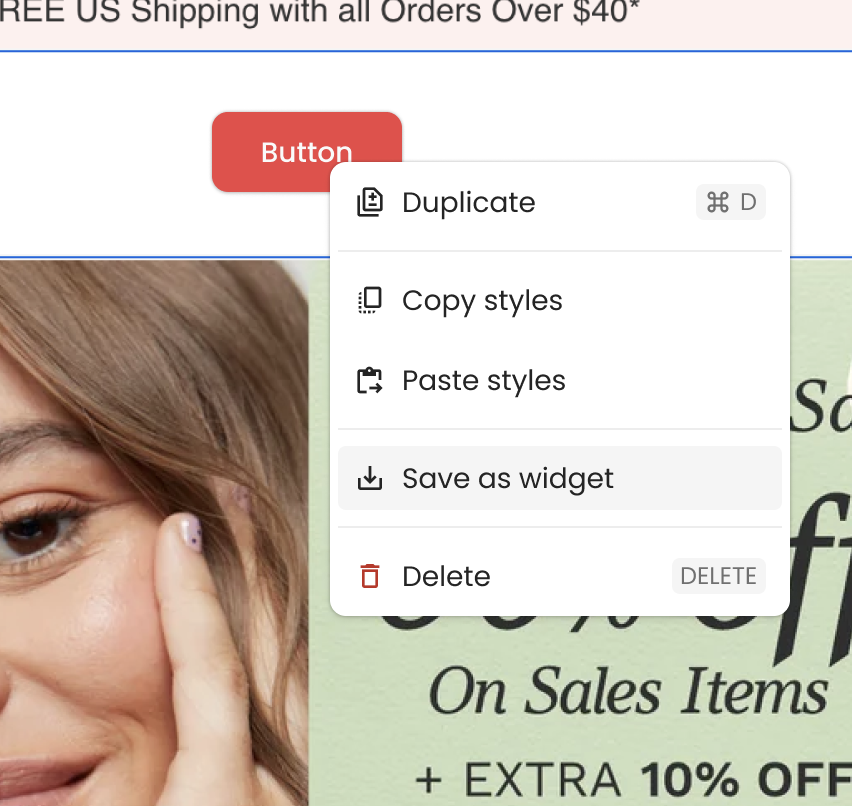
- •Right-click any section to save it as a reusable widget
- •Access saved widgets from the Custom tab in the left panel
- •Drag a widget into any template to reuse it instantly
- •Section actions: Duplicate, Copy styles, Paste styles, Save as widget, Delete
- ✕Text editing only via side panel input
- ✕No undo / redo, no auto-save
- ✕No custom fonts or colours
- ✕No background images for sections
- ✕Templates broken on mobile
- ✕Renaming template shows no error
- ✕Left panel and canvas out of sync
- ✕Resize by numeric input only
- ✕No way to save or reuse sections across templates.
- ✓Direct on-canvas text editing
- ✓Full undo / redo with auto-save
- ✓Brand kit with permission-gated custom styles
- ✓Section background images with fallback colour
- ✓Responsive mobile stack layout
- ✓Real-time rename validation
- ✓Left panel always in sync with canvas
- ✓Drag-to-resize elements on canvas
- ✓Save any section as a reusable widget, accessible across all templates.
AI Design Copilot
Users consistently highlighted the need for AI-assisted workflows during research and design exploration. In response, we developed an integrated AI Copilot built directly into the editor. Available at every stage of the workflow, it helps users generate content, edit layouts, and refine designs without breaking focus or leaving the canvas.
Validation
After completing the redesign I ran a second round of moderated testing with the same cohort of daily active users. Participants walked through the full template creation and editing journey on the new prototype, then rated it compared to the current tool on a 1–7 Likert scale.
“This function is quite useful and saves me a lot of time. I mainly use it when I need to build the same email for other locales. I can simply duplicate the email, then swap the widget in another language. Improves time quite a lot, 15–30 mins per email.”CRM user, post-design validation
When conducting validation, I'm looking for data across the feature changes, like the quote above. It gave us avenues to estimate impact quantitatively, so we went back and did some additional research, including average hourly rate of a marketing executive and how long an email actually took to build with the current tool (around two hours on average).
On reflection, capturing time-on-task directly by shadowing users at the start of the project would have produced sharper, observed numbers rather than self-reported estimates and secondary research. A takeaway I'll carry into future projects.
However here are some metrics I made about the reusable widget:
This was one of many features tested in the project, with metrics created across multiple feature changes. From here, I worked with the product manager to scope the high value features and marked the ticket as ready for development, I continued to support the engineering team in a refinement capacity through delivery, helping clarify intent, unblock edge cases, and protect the design decisions that came out of validation.
Thanks for reading
If you’re looking for a product designer who works end-to-end, research, systems, delivery, I’d love to chat.